How to Know If Your BE International Account Is Active?
When you sign up as a Independent Business Owner (IBO) or member with BE International, ensuring your registration is fully processed is essential before placing product orders or accessing member benefits.
Here is a complete guide to understanding the BE International member registration confirmation process, how to verify your account status, and what steps to take if you run into issues.
Quick Summary: How to Confirm Your BE International Membership Registration?
To verify your BE International member registration is confirmed, look for the following three indicators immediately after you have made the payment for your BE membership sign-up process:
- Email Notification: You receive an official welcome email titled “Welcome Letter @ NEW REGISTRATION”.
- IBO Code & Temporary Password: The welcome email contains your unique IBO Code and the Temporary Password.
- BE4U Webapp Access: You can successfully log into the BE4U Web App or member portal using your IBO code.
What Information Is Included in the Registration Confirmation Email?
The Welcome Letter @ NEW REGISTRATION email serves as your official proof of membership confirmation. It contains:
- Your Unique IBO Code: Your official member identification number.
- Temporary Password: Credentials to log into your account for the first time.
- BE4U Web App Access Links: The access link to the BE4U web app.
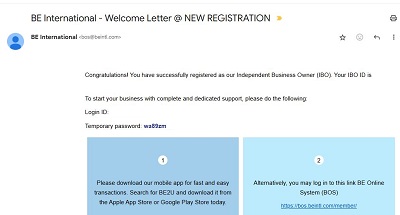
Above is a screen capture of the BE International member registration confirmation email.
Frequently Asked Questions (FAQ)
If you did not receive the “Welcome Letter @ NEW REGISTRATION” email within a few minutes of completing payment, check the Spam folder. Automated verification emails are sometimes flagged by mail filters.
BE International membership registration confirmation is instant. As soon as you’ve paid the registration fee, the system dispatches the welcome confirmation email immediately.
No, you do not.
You have to reset your password at the member log in page within the BE4U web app.
If you’ve entered an incorrect email address during the member registration process, you have to contact BE customer service to update the correct email address.
That’s all for my sharing in this article.
I hope the article above clarified how you will know if your BE International member registration process was successful.
If you have questions, you can contact me through the following:
WhatsApp number: +60176037698
You can also click the link below to message me direct on my WhatsApp and I will assist you.